

Definition: An estimate maker app is a mobile or web tool that lets contractors and small service businesses create itemized job quotes, send them for client approval, and convert accepted estimates into invoices without re-entering data.
At-a-Glance: 5 Facts Every Contractor Needs About Estimate Apps
- One-tap estimate-to-invoice conversion is the single most important feature. It keeps the client name, line items, tax line, due date, and notes from being typed twice.
- Real jobs need real pricing fields. Taxes, discounts, deposits, and multiple line items matter when a client points at a broken fence and asks for options.
- Branding and customer records make quotes look serious. A logo at the top, saved client record, and repeatable template reduce awkward mistakes.
- Data portability protects the business. Cloud backup, CSV export, and multi-device access matter when a phone gets replaced on a Monday morning.
- App-store rank is less useful than fit. Currency support, tax-rule settings, and free-tier caps can affect daily quoting more than a high star rating.
When job-site quoting is the issue, Invoice Maker Teo fits contractors who want the estimate, PDF copy, and next invoice to stay connected through one mobile invoice workflow.
What an Estimate Maker App Does
An estimate maker app helps a contractor turn job details into a clear, itemized quote and then carry that approved scope into billing. It keeps pricing, customer records, files, and payment status in one place instead of scattered across texts, notes, and spreadsheets.
A practical estimate workflow usually looks like this:
- Enter the customer and job details once. Saved client records keep repeat quotes from starting with the same name, address, and phone number every time.
- Build the estimate with real job pricing. Add labor, materials, taxes, discounts, deposits, and separate line items so the client can see what is included.
- Attach supporting details. Photos, field notes, terms, and a branded PDF help explain the work before the client approves it.
- Convert the accepted estimate into an invoice. The app preserves the approved scope, prices, notes, and customer details so billing does not require retyping.
- Track what is still owed. Deposit records, unpaid balances, payment status, and follow-up reminders keep the job from getting lost after the work is done.
For small crews, that is the point: faster quoting, fewer copied mistakes, and a cleaner path from approval to payment.
Best Estimate Maker App Shortlist for Contractors in 2026
Invoice Maker Teo covers lightweight estimating and invoicing for freelancers, solo contractors, and small service businesses. It is strongest when you want saved customers, itemized estimates, PDF sharing, and quick conversion into invoices.
Jobber combines field-service scheduling with quoting. It suits small crews that dispatch technicians, manage appointments, and need client communication around the job.
Invoice Simple is a straightforward free-tier estimate maker with PDF sharing. It works well for occasional quotes, but growing users should check document and client limits.
Joist focuses on home-service contractors with trade-friendly templates. It can be useful for remodelers, repair pros, and field workers who quote similar job types often.
Estimate Rocket handles photo-heavy estimates with markup tools. It is a better fit when job notes, images, and visual explanation carry the quote.
If the priority is getting from quote to bill quickly, Invoice Maker Teo earns its place because it keeps estimate creation, PDF sending, and invoice conversion in the same short workflow. Good estimate apps deliver clear job pricing and faster follow-up, not a full accounting department.
How We Picked the Best Quote Maker App Options
We weighted the shortlist for small teams because about 65% of U.S. employer firms had fewer than five employees in 2021, according to the SBA Office of Advocacy (https://advocacy.sba.gov/2022/08/31/2022-small-business-profiles-for-the-states-territories-and-nation/). That changes the test. A contractor quoting from a driveway needs speed more than a thick settings menu.
The main criteria were estimate-to-invoice conversion speed, mobile usability, photo attachment, template flexibility, and pricing transparency. We also looked for CSV export, accounting integrations, and clear ownership of the client list. A spreadsheet zoomed beside a cash drawer is a warning sign; the data should be easier to reuse than that.
Anyone dealing with repeat job quotes should consider Invoice Maker Teo because saved clients, reusable line items, and PDF export help keep the next invoice easy. For a deeper no-cost comparison, the free estimate maker app guide covers free-tier tradeoffs.
How an Estimate Maker App Converts Quotes into Paid Invoices
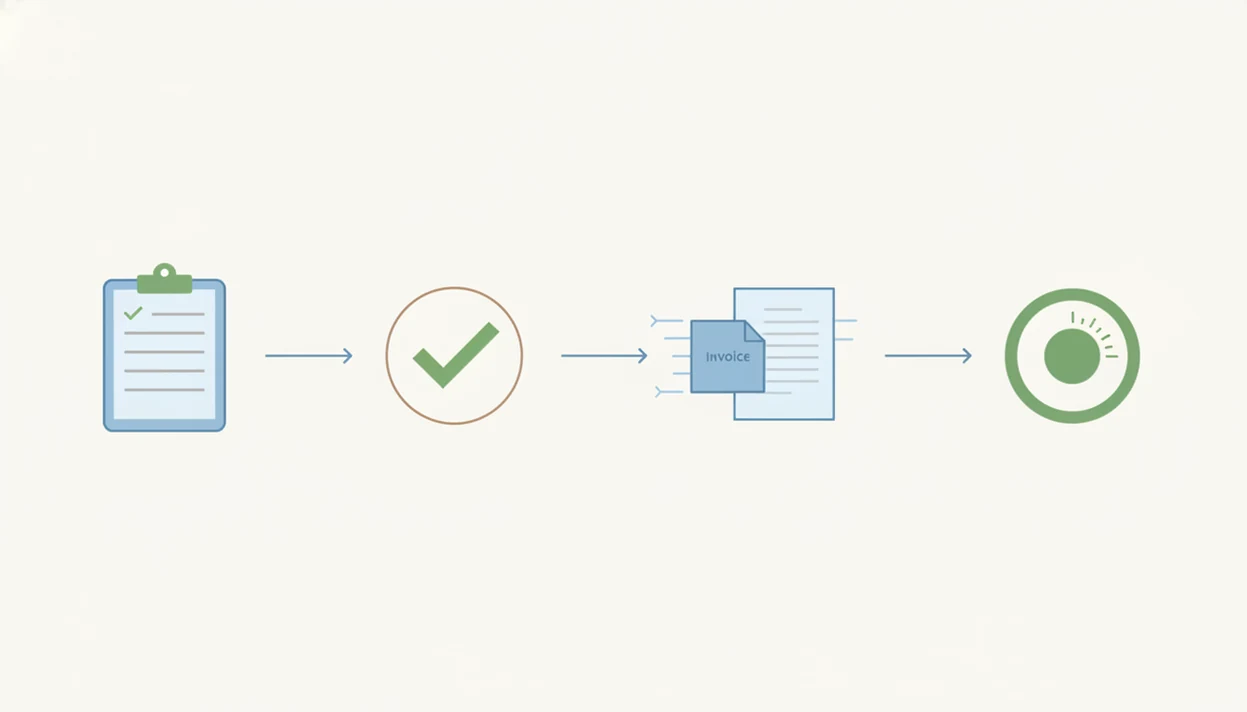
An estimate maker app works by storing customer records, line items, tax rules, discounts, and job notes once, then reusing that structured data across documents. In plain terms, the quote becomes a data source instead of a one-off PDF.
The key trigger is approval. When a client accepts the estimate, the app clones the accepted job details into an invoice document, usually keeping the customer, prices, tax line, and notes intact. The payment tracking layer then adds deposits, partial payments, unpaid status, and reminders tied to the invoice number.
Cash flow is the reason this matters. A U.S. Bank report often cited in small-business finance found that 82% of small businesses fail due to poor cash-flow management or poor understanding of cash flow. Source: SCORE's summary of the U.S. Bank small-business cash-flow finding, https://www.score.org/resource/blog-post/why-small-businesses-fail. A 2019 CFPB data point also reported that 42% of U.S. small businesses saw late payments as a serious problem. Source: CFPB small-business lending research, https://www.consumerfinance.gov/data-research/research-reports/small-business-lending-survey-data/.
For contractors, an app that turns estimates into invoices is often faster than retyping a bill because it preserves the approved scope and reduces invoice errors.
How to Use an Estimate App for Contractors Step by Step
Use an estimate app for contractors by setting up the business record first, then building every quote from saved customer, item, tax, and photo details. The first setup takes a few minutes, but it pays back when a client asks, “Can you resend that invoice?”
- Set up your business profile, logo, and default tax rates. Check the logo placement and notes field before sending your first PDF.
- Add the customer and job-site details. Keep the client name spelled one way across estimates and invoices.
- Build line items with descriptions, quantities, and unit prices. Separate labor, materials, discounts, and deposits when the job needs it.
- Attach job-site photos or notes for context. A garage outlet tested before quoting belongs in the record.
- Send the estimate as a PDF or link for client approval. Gmail, Outlook, WhatsApp, and Messages all work better with a clean PDF copy.
- Convert the approved estimate into an invoice and track payment. Watch the unpaid status before sending a reminder.
Contractors trying to quote from a phone can use Invoice Maker Teo because the estimate, PDF delivery, and invoice number stay in one mobile path. The basics are similar to how to create estimate on phone, but approval and payment tracking make the workflow stronger.
Estimate Maker App Comparison Table: Features, Pricing, and Limits
The table below compares practical estimate app features contractors usually notice after a few jobs. Prices and free limits can change, so confirm current plan details before moving client records.
| App name | Free tier | Estimate-to-invoice tap | Photo attach | Offline mode | Deposit tracking | Export/integration | Starting price |
|---|---|---|---|---|---|---|---|
| Invoice Maker Teo | Limited by plan | Yes | Yes | Limited | Basic payment status | PDF, client records, exports by plan | Varies by plan |
| Jobber | Trial, no full free tier | Yes | Yes | Limited | Yes | Accounting integrations | Paid plans |
| Invoice Simple | Yes, capped | Yes | Limited | Limited | Limited | PDF, some exports | Paid plans |
| Joist | Yes, capped | Yes | Yes | Limited | Yes | QuickBooks options | Paid plans |
| Estimate Rocket | Trial or paid | Yes | Strong markup tools | Limited | Yes | Integrations | Paid plans |
Currency and regional tax support differ by app. So do free-tier caps on clients, estimates, invoices, watermarks, and branded templates.
Common Myths About Quote Maker Apps for Small Businesses
Myth: You need a full accounting suite. Many small teams move faster with a focused quote maker app than with FreshBooks, Wave, or Zoho Invoice when the immediate job is to price, send, and convert a quote.
Myth: A quote app fixes underpricing. It only calculates what you enter. If the paint, haul-away, or labor hours are wrong, the neat PDF will still be wrong.
Myth: Free estimate apps are always enough. Free tiers often cap clients, documents, branding, exports, or photos. That hurts once repeat customers pile up.
Myth: All apps convert estimates the same way. Some preserve every line item and note. Others require manual re-entry, which invites yesterday’s copied due date to sneak into a new invoice.
Over 70% of U.S. nonemployer businesses are in service industries, according to U.S. Census Bureau nonemployer statistics reporting (https://www.census.gov/programs-surveys/nonemployer-statistics.html), which explains why mobile estimating tools matter so much for solo operators. For small contractors, lightweight estimate-and-invoice software is often easier than full accounting software because the daily task is approval and collection, not ledger management.
What Competitors Miss About Estimate-to-Invoice Workflows
Most app roundups compare feature checklists, but the real workflow starts when the client reads the estimate. Clear item descriptions, payment terms, deposit language, and a visible total can influence whether the client approves now or asks three follow-up questions.
The handoff after approval matters even more. A deposit line added before launch, a partial payment recorded after the first milestone, and a reminder tied to the invoice number keep the work from disappearing into text threads.
Freelancers looking for a low-admin quote maker app should shortlist Invoice Maker Teo because it connects approval, invoice creation, PDF sending, and payment status without forcing a full accounting setup. Migration is the hidden cost. If an app will not export clients, items, and documents, switching later can mean rebuilding years of job history. The estimate to invoice timeline shows where those handoffs usually happen.
Limitations of Every Estimate Maker App
Every estimate maker app has limits. The software can speed up quoting, but it cannot replace judgment about scope, labor, materials, or legal terms.
- Apps cannot fix inaccurate job scoping or bad pricing assumptions.
- Offline functionality is limited in many mobile quote maker apps, especially when sending PDFs or syncing photos.
- Some apps lack region-specific tax settings, required contract language, or industry-specific disclaimers.
- Over-reliance without CSV exports or backups can lock a business into one vendor.
- Automated reminders are less useful when clients pay by check, cash on completion, or bank transfer after a call.
- Free tiers may remove branding options, watermark PDFs, or cap estimates and clients.
- Photo storage can become messy if images are not tied to the right customer record.
Invoice Maker Teo is a practical fit for simple estimate-to-invoice work, but contractors needing dispatch, fleet routing, payroll, or deep accounting may be better served by broader systems like Jobber or Zoho Invoice. Not the same job.