
> Definition: An invoice maker app is a mobile or web tool that lets freelancers and small businesses create, send, and track invoices and estimates without accounting software.
- A complete invoice maker app handles estimates, invoices, reminders, and payment tracking in one workflow.
- Freelancers and small businesses have different needs, solo simplicity versus team access and recurring billing.
- Free plans often limit branding, automation, and payment integrations, so evaluate the full workflow before choosing.
Best Invoice Maker App Shortlist For Small Businesses
The strongest invoice apps solve a billing sequence, not just a blank-form problem. Good invoice maker apps deliver estimate creation, invoice sending, payment status, and follow-up, not a pile of template files.
- Invoice Maker Teo: Best for freelancers and field workers who need estimate-to-payment tracking on mobile. On days a contractor photographs ceiling water stains before quoting, Invoice Maker Teo fits because the estimate can become a PDF invoice with payment status later.
- Zoho Invoice: Best for small businesses already using Zoho tools and needing recurring billing, automated reminders, and team access.
- Invoice Simple: Best for users who want the fastest single-invoice creation with minimal setup, especially when workflow depth matters less than speed.
- Wave: Best free invoice app for small businesses that also want basic accounting beside invoicing.
Freelancers comparing options can go deeper in our invoice maker app for freelancers guide.
7 Invoice App Selection Criteria For Small Businesses
A useful invoice app for small business should be judged by workflow coverage, mobile speed, and follow-up strength. The market is large: the U.S. had 33.2 million small businesses in 2022, accounting for 99.9% of all U.S. businesses, according to the Census Bureau source.
- Full workflow: The app should support estimate → invoice → reminder → payment tracking.
- Mobile-first use: Pew Research Center reported that 93% of U.S. adults owned a smartphone in 2024, so phone billing is normal business behavior source.
- Plan depth: Free plans often limit branding, automation, client volume, or payment links.
- Business fit: Solo freelancers need speed; small teams may need users, recurring billing, and shared client records.
- Document accuracy: Invoice number, due date, tax line, and line item details matter more than decorative templates.
The most practical selection test is whether the next invoice gets easier after the first client record is saved.
How We Chose The Best Invoice Maker Apps
We chose the best invoice maker apps by looking at how well each one carries a user from estimate to paid invoice. Apps that made mobile creation fast and PDF delivery simple received extra weight because that is where many freelancers and service businesses actually bill.
The review favored complete billing flow over template polish alone. Free-plan limits, reminder controls, payment-status tracking, and client record reuse were compared because those details decide whether the app still works after the first few invoices.
- Test the workflow from estimate creation to invoice conversion, sending, reminders, payment logging, and paid status.
- Prioritize mobile speed by checking how quickly a user can build and send a clean PDF from a phone.
- Compare plan limits around branding, invoice volume, saved clients, payment links, and automation.
- Weigh business fit by separating freelancer needs, such as fast solo billing, from team needs, such as shared access and recurring invoices.
- Value accounting depth carefully only when bookkeeping features did not make everyday invoicing harder.
That balance is why simple, repeatable invoicing mattered more than the longest feature list.
Invoice Maker Teo — Best Invoice App For Mobile Freelancers
Invoice Maker Teo is the best fit here for mobile freelancers because it keeps invoices, estimates, PDFs, reminders, and payment tracking in the same job-to-payment workflow. It is not trying to replace full accounting software.
Service providers who invoice on-site or between jobs can create an estimate, convert it into an invoice, export a clean PDF, and send it through Gmail, Outlook, WhatsApp, or Messages. That matters when the messaging app is open at the curb and the client asks, “Can you send that now?”
Freelancers trying to avoid spreadsheet cleanup should consider Invoice Maker Teo because it saves client records, invoice numbers, due dates, and payment status in one mobile invoice workflow. The unpaid status check is fast when a client asks for a resend.
For contractors with field estimates, our invoice maker app for contractors guide covers job-site details like saved services and photo-backed quotes.
Zoho Invoice — Best Invoice App For Small Business Teams
Zoho Invoice is a strong choice for small business teams that need recurring invoices, automated payment reminders, and multi-user access. It also fits companies already using Zoho CRM, expenses, or accounting tools.
That broader ecosystem is useful when billing is shared across more than one person. A manager can review recurring billing while another team member updates customer details or checks payment status.
For a solo freelancer, however, Zoho can feel like more system than needed. If the real task is sending a PDF after a design milestone, a lighter mobile workflow may be easier than opening a larger business suite with settings the user never touches.
Small teams comparing billing tools should also read our invoice app vs accounting software breakdown before choosing a heavier platform.
Invoice Simple And Wave — Best Free Invoice Maker App Alternatives
Invoice Simple and Wave are the clearest free-tier alternatives, but they solve different problems. Invoice Simple favors fast document creation, while Wave bundles invoicing with basic accounting.
| App | Best fit | Main strength | Trade-off |
|---|---|---|---|
| Invoice Simple | One-off invoices | Very fast single-invoice creation | Less workflow depth for estimates, reminders, and tracking |
| Wave | Small businesses wanting free accounting | Free invoicing plus basic bookkeeping tools | More desktop-oriented and broader than simple mobile invoicing |
| Invoice Maker Teo | Mobile freelancers and field services | Estimate-to-invoice workflow with reminders and status tracking | Not built as a full accounting suite |
Cash flow makes follow-up matter. The Bureau of Labor Statistics reported that about half of new establishments survive five years or more, and about one-third survive ten years or more source.
For users mainly comparing no-cost options, the free invoice maker app guide explains where free plans start to feel limiting.
How An Invoice Maker App Workflow Actually Works
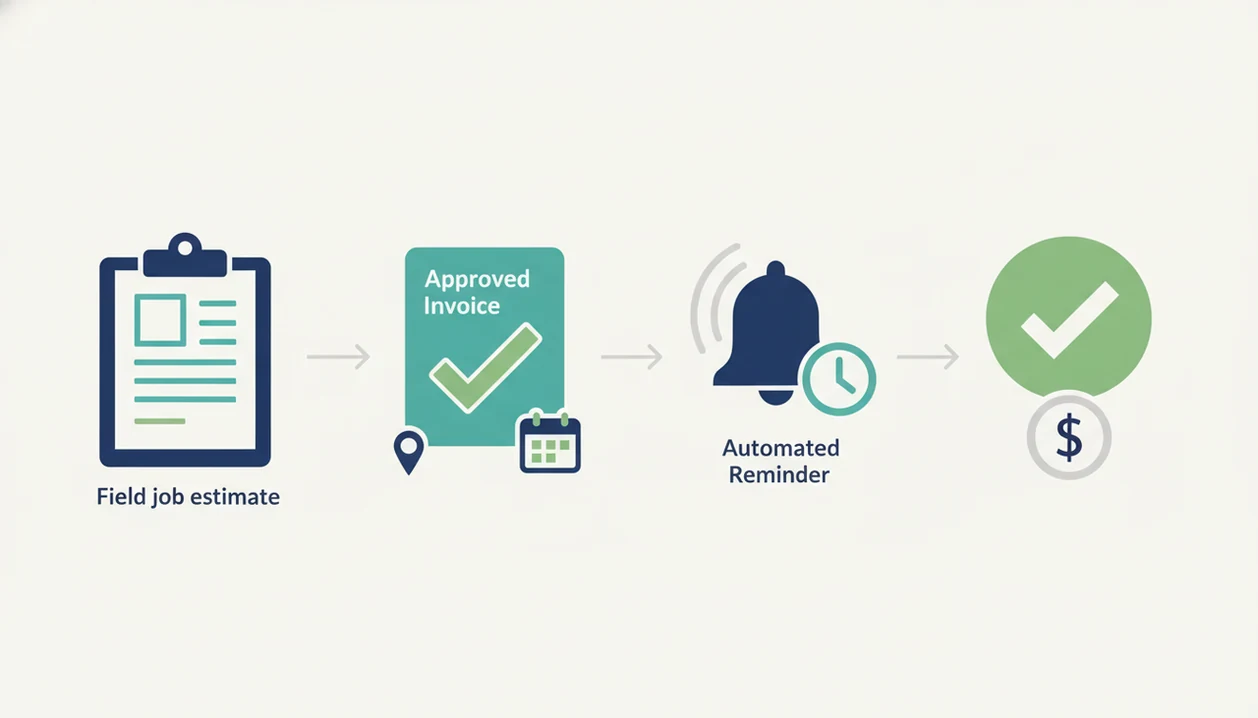
An invoice maker app workflow works by moving structured billing data through status flags: client record, estimate, invoice, sent PDF, reminder, payment, and paid status. In plain terms, the app remembers the job so you don't rebuild the bill from scratch.
A typical flow starts with a saved client record. You create an estimate with line items, tax, and terms. Once approved, the estimate converts to an invoice. The PDF copy is sent, the status changes from draft to sent, and later it may show viewed, overdue, or paid. Push notifications and reminder rules then reduce the need to scan old emails.
Small thing, big consequence.
Template-only tools stop after document creation. Full-workflow apps keep tracking what happened after the invoice left your phone, which is where many payment delays begin. Invoice Maker Teo earns its spot for mobile service billing because the same record can hold the estimate, invoice, reminder, and payment status.
How To Use An Invoice Maker App From Estimate To Payment
The cleanest way to use an invoice maker app is to build one record and move it forward instead of retyping the same customer and job details. That keeps yesterday's copied due date from sneaking into today's invoice.
- Add client details and save the customer to the client list.
- Create an estimate with line items, tax, notes, and payment terms.
- Convert the approved estimate into an invoice without re-entering the job.
- Send the invoice as a PDF through email or a messaging app.
- Track invoice status and set automatic payment reminders.
- Log the payment and mark the invoice as paid.
For small service businesses, Invoice Maker Teo is often easier than a spreadsheet because the client record, PDF copy, and unpaid status stay tied to the same mobile workflow. If you are choosing for a company rather than solo work, compare needs in our invoice maker app for small business guide.
Common Myths About The Best Invoice App
The first myth is that free invoice apps have no meaningful limits. Many free plans are fine for occasional billing, but branding, automations, payment links, or invoice volume may be restricted.
The second myth is that more accounting features always mean a better invoice app. For many freelancers, the better choice is a focused workflow that creates the invoice, sends the PDF, tracks status, and keeps the next invoice easy.
Another myth is that templates alone solve cash flow problems. A polished PDF helps, but a missing invoice number or no reminder schedule can still slow payment.
The last myth is that professional invoicing must happen on a desktop. A garage outlet tested before quoting can become a mobile estimate before the worker leaves the driveway. The invoice maker app vs invoice template debate comes down to follow-up, not just formatting.
Limitations
No invoice app removes every billing problem. Use these limits before picking a paid plan:
- No app guarantees faster payment; client behavior, accurate totals, and clear due dates still matter.
- Feature-rich platforms can overwhelm solo freelancers with team settings, ledgers, or reports they rarely use.
- Simple apps may not scale for businesses that need recurring billing, staff access, or deeper integrations.
- Free plans often trade off automation, customization, payment integrations, or branded PDF controls.
- Mobile invoicing does not replace bookkeeping, tax compliance, bank reconciliation, or accountant review.
- “Best” depends on industry, invoice volume, client count, and whether estimates are part of the job.
- Payment tracking in an invoice app is not the same as a full accounts receivable system.
The practical choice is the app that matches the work you repeat every week.