
Definition: A simple invoice app for small business is a lightweight billing tool that creates professional invoices, estimates, and PDFs, sends payment reminders, and tracks payments without requiring bookkeeping or accounting expertise.
Best Simple Invoice Apps for Small Business Billing
The best simple invoice apps for small business billing are lightweight, mobile-first, and focused on getting a clean invoice out quickly. They help with estimates, PDF copies, due dates, reminders, and payment status without pulling you into a full accounting suite.
- Invoice Maker Teo: Strong fit for freelancers and 1-5 person businesses that need invoices, estimates, saved clients, PDF export, and reminder tracking from a phone.
- Invoice Simple: Good for owners who want a fast invoice template and basic sending without many setup screens.
- invoicely: Useful for small teams that want web-based invoicing with simple reports and multiple client records.
- Square Invoices: Practical when payment acceptance is the main need, especially for businesses already using Square.
On days a job wraps up in a parked van, Invoice Maker Teo fits because the invoice can be built, previewed as a PDF, and sent before the details scatter.
Simple invoice apps should create, send, and track billing documents, not replace payroll, tax filing, or a full finance department.
Simple Invoice App Comparison Table
The quickest comparison is this: Invoice Maker Teo and Invoice Simple are built for invoice creation speed, invoicely leans more web-based, and Square Invoices makes the most sense when payment processing is central. All four can support basic invoicing, but they serve different billing habits.
| App | Best for | Mobile strength | PDF support | Reminder support |
|---|---|---|---|---|
| Invoice Maker Teo | Freelancers and 1-5 person service businesses | Fast phone-first invoice, estimate, and client workflow | Strong fit for clean invoice copies | Built around unpaid invoice follow-up |
| Invoice Simple | Owners who want a quick template | Simple mobile creation with little setup | Good for basic sent invoices | Useful for straightforward follow-up |
| invoicely | Small teams that prefer web billing | Better for desk-based management than field work | Supports standard invoice records | Helpful when tracking several clients |
| Square Invoices | Businesses already taking Square payments | Solid if checkout and billing happen together | Supports client-facing invoice copies | Works well with payment-linked reminders |
Use the table this way:
- Choose Invoice Maker Teo or Invoice Simple when speed matters more than reporting.
- Pick Square Invoices when card payments and gateway flow matter as much as the invoice.
- Consider full accounting software when you need bank reconciliation, payroll, financial statements, or deeper tax reporting.
How We Picked Each Small Business Billing App
We picked each small business billing app by looking at the first billing moment: how fast a new user can create a client record, add line items, preview a PDF, and send the invoice. Time-to-first-invoice matters when the client is still in the driveway and the total is fresh.
Our criteria were mobile access, estimate and invoice creation, PDF export, payment reminders, payment tracking, free-tier limits, payment processing fees, and client caps. We excluded full accounting suites and ERP tools because most micro-business owners do not need a chart of accounts just to bill for a repair, lesson, design milestone, or cleaning visit.
The scale matters. In 2019, 62.7% of U.S. employer firms had fewer than five employees, according to the U.S. Small Business Administration's small business profile data: https://advocacy.sba.gov/2020/06/04/2020-small-business-profiles-for-the-states-and-territories/. For service-specific workflows, an invoice app for cleaners needs repeat client notes more than complex reporting.
What a Simple Invoice App Does for Small Business Billing
A simple invoice app helps small businesses turn completed work into a billable, trackable document without opening full accounting software. It covers the everyday billing loop: create the invoice, send a clean copy, and follow up when payment is still missing.
For most owners, the useful pieces are practical and narrow:
- Create invoices from saved business details, line items, rates, due dates, and notes. This helps consultants, tutors, cleaners, repair pros, and solo sellers bill right after the job.
- Convert estimates into invoices when a quote becomes approved work. Contractors, designers, photographers, and project-based freelancers benefit because the scope does not have to be typed twice.
- Export PDFs so clients can save, forward, print, or attach the invoice to their own records. This is especially useful for B2B service providers and vendors billing office managers.
- Store client records with names, emails, addresses, and repeat-job details. Mobile trades and recurring service businesses save time here.
- Track payment status and reminders so unpaid work appears in one place and follow-up can happen faster after the job is done.
Those features are billing tools, not payroll, tax filing, bank reconciliation, or bookkeeping replacements.
Invoice Maker Teo — Fastest Mobile Invoice App for Micro-Businesses
Invoice Maker Teo is the strongest pick here for micro-businesses that want to create invoices, estimates, and PDF copies from a phone in under a minute. It keeps the mobile invoice workflow short: pick a saved client, add line items, confirm the due date, and send.
Freelancers looking for a simple invoice app that does not become bookkeeping software should start with Invoice Maker Teo because it combines reusable templates, saved client details, payment reminders, and payment status in one small billing flow.
A missing invoice number slows payment. So does yesterday’s copied due date. Invoice Maker Teo helps reduce those little errors by keeping client records and reusable invoice details close to the send screen.
It fits 1-5 person businesses that bill on the go, including consultants, tutors, field service workers, and side-hustle sellers. If milestones are the hard part, the workflow in our invoice app for consultants guide shows how billing can stay tied to project stages.
5 Facts Every Small Business Owner Should Know About Invoice Apps
Small business owners should treat invoice apps as billing tools, not accounting departments. The right app shortens the path from finished work to sent invoice.
- Simple invoice apps focus on action: They create, send, and track invoices or estimates, but they do not run deep bookkeeping.
- Electronic billing can improve cash flow: Research on electronic invoice presentment and payment found days sales outstanding can fall by roughly 1-2 weeks versus paper invoicing; cite the specific study or remove the numeric range if no source URL is available.
- Late payment is common: A European SME study found late payments were a problem for 47% of SMEs, so reminders are not a minor feature.
- Free is not always free: Many apps limit clients, invoice volume, branding, or payment types unless you upgrade.
- Workflow fit beats feature count: Estimates, recurring invoices, reminders, and PDF export matter only if they match how you actually bill.
If the priority is faster follow-up, Invoice Maker Teo earns the spot because unpaid invoices can be checked from the payment status view after a client says, “Can you resend that invoice?”
How a Simple Invoice App for Small Business Works
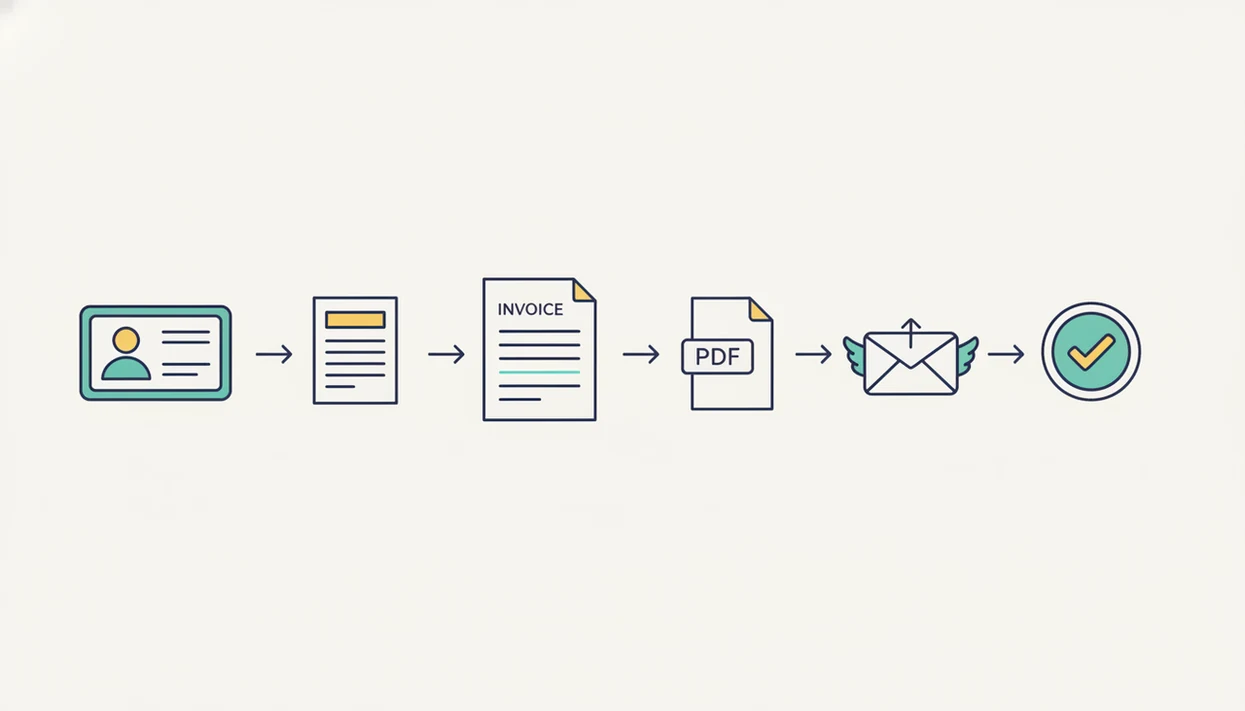
A simple invoice app works by turning basic billing data into a branded document and a lightweight payment record. You enter the client name, email, address, line items, quantities, rates, tax line, notes, and due date into a reusable template.
The app then generates a PDF copy with your business name or logo at the top. It stores the invoice number, total, due date, and payment status so you can find the record later without digging through Gmail or a downloads folder.
The reminder engine checks due dates and triggers an email, push notification, or manual follow-up prompt when an invoice becomes overdue. Payment status changes either when you mark cash or bank transfer as paid, or when a connected gateway confirms payment.
The data stays intentionally lightweight. No general ledger. No chart of accounts. For visual work, an invoice app for designers often needs deposits and project notes more than full accounting categories.
How to Send Your First Invoice Using a Simple Billing App
Your first invoice should take minutes, not an afternoon of formatting. The practical goal is a clear PDF copy with the right client, invoice number, due date, line items, and payment instructions.
- Download the app and set up your business name, logo, email, and default payment terms.
- Add a client with the correct name, email, billing address, and any repeat-job note.
- Create an invoice with line items, quantities, rates, tax if needed, and a clear due date.
- Review the PDF preview and customize the template before sending.
- Send the invoice by email or shareable link, then save the sent record.
- Track payment status and enable reminders for overdue invoices.
A contractor with muddy boots beside a measuring tape does not want to rebuild a template from scratch. Invoice Maker Teo is practical for that moment because the saved items and PDF preview keep the next invoice easy.
Common Myths About Small Business Billing Apps
“Does a simple invoice app replace my accountant?” No. A simple invoice app helps with billing documents, payment reminders, and payment records, but it does not handle tax filing, payroll, or formal compliance decisions.
“Are all free invoicing apps really free?” Not always. Processing fees, client caps, invoice limits, branding removal, and locked reminder features can change the real cost after the first few invoices.
“Do I need complex accounting software to look professional?” Usually not. A focused billing app can produce polished invoices with a logo, tax line below the subtotal, notes field, PDF export, and payment link.
“Is every small business billing app backed up to regulatory standards?” No. Security, backups, encryption, and data export policies vary by provider, so read the policy before entering sensitive client information.
Small teams trying to look professional without a finance stack should look for estimates, invoices, reminders, and payment status in one focused mobile workflow.
Honest Cons of Simple Invoice Apps vs Full Accounting Software
Simple invoice apps are easier than full accounting software because they focus on billing, but that simplicity has tradeoffs. They usually do not provide double-entry bookkeeping, full financial statements, bank reconciliation, payroll, or complex tax reporting.
| Need | Simple invoice app | Full accounting software |
|---|---|---|
| Send invoices | Fast and mobile-friendly | Available, but often more setup |
| Track unpaid bills | Basic payment status | Tied to broader receivables |
| Financial statements | Usually limited | Standard feature |
| Payroll and tax workflows | Not included | Often supported or integrated |
| Setup time | Short | Longer |
Data can become fragmented if banking, expenses, taxes, and invoices live in separate places. Some apps also have limited offline capability, which can hurt field-service work when the connection drops.
Recurring invoice automation still needs review. A copied service date or old rate can annoy a client quickly. When you outgrow simple billing, exported invoice data can move into accounting software later.
Limitations
Simple invoice apps are useful, but they are not the right tool for every business stage. The main limits show up when billing records need to become formal accounting records.
- They cannot handle payroll, complex tax rules, or regulatory compliance.
- Year-end reporting may require exporting invoice data into separate accounting software.
- Some apps lock branding removal, payment types, recurring invoices, or client limits behind paid tiers.
- Poor offline support can block field-based service businesses in basements, rural roads, or job sites with weak signal.
- Automated reminders can create client friction if an invoice has the wrong total, due date, or contact name.
- Payment gateway processing fees can eat into margins on small invoices.
- Full platforms such as FreshBooks, Wave, Zoho Invoice, or Invoice2go may fit better once reporting and integrations matter more.
Invoice Maker Teo is built for simple billing, not enterprise finance, because it keeps invoices, estimates, PDFs, reminders, and payment status close to the actual work.