
Estimate To Invoice Timeline: From Quote Approval To Payment Record
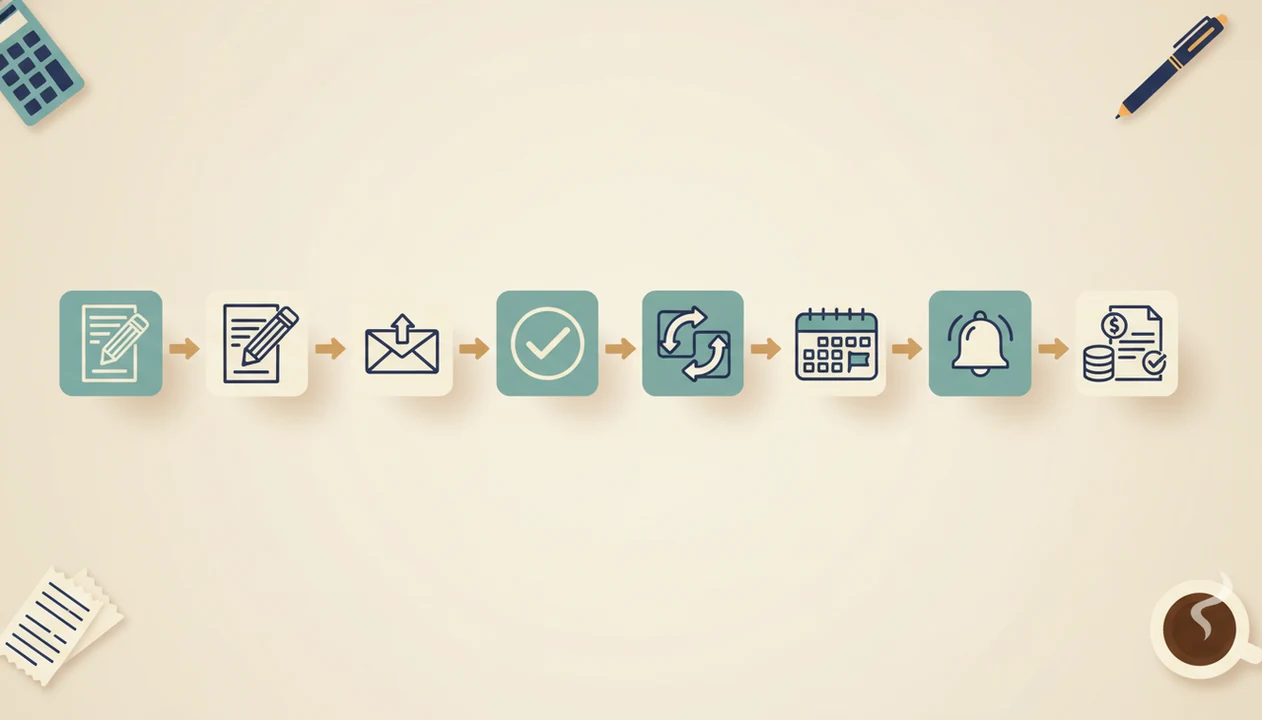
An estimate to invoice timeline is the full path from sending a quote, getting client approval, converting it into an invoice, setting due dates, and tracking the payment record. For freelancers and small businesses, the fastest workflow is to standardize approval steps, convert the approved estimate directly into an invoice, and follow up before and after the due date.
Definition: The estimate to invoice timeline is the documented sequence of estimate creation, client review, estimate approval, invoice conversion, invoice delivery, payment follow-up, and final payment recording.
TL;DR
- The timeline starts when the estimate or quote is created, not when the invoice is sent.
- The main stages are estimate creation, client approval, invoice conversion, invoice delivery, due-date tracking, reminders, and payment recording.
- A mobile quote to invoice workflow helps reduce retyping, missed follow-ups, and inconsistent payment terms.
Estimate To Invoice Timeline At A Glance
An estimate to invoice timeline maps the billing path from first price quote to final paid record. The basic sequence is: estimate created, sent, viewed, approved, converted, invoiced, due, and paid.
The important point is timing. The timeline begins before the invoice exists, usually when a service provider builds the estimate from scope, rates, quantities, taxes, notes, and payment terms. That early record becomes the base for the later invoice number, due date, and payment status.
A phone balanced on a paint bucket is not the place to rebuild a job quote from memory. Keep the quote clean from the start.
Invoice Maker Teo is an invoice maker app that creates invoices, estimates, PDFs, reminders, and payment tracking for freelancers and small businesses.
Before You Start: Prepare Approval Terms And Payment Rules
Before you build the estimate, decide what approval means and how payment will work. This gives the later invoice a clean starting point instead of forcing you to fix terms after the client has already said yes.
- Set the timing rules for the estimate, including when it expires, what event triggers a deposit, and the default invoice due date you will use after conversion.
- Confirm the client record before sending anything: contact name, email or phone number, billing address, tax status, and whether the client prefers PDF delivery by email, text, WhatsApp, or another channel.
- Prepare the billing details you reuse often, such as standard service lines, rates, quantities, discounts, tax notes, and short payment instructions.
- Define approval clearly so there is no guessing later. Accepted proof might be an email reply, digital signature, purchase order, online acceptance, or received deposit.
- Create a scope-change rule before work starts. If the client adds work, update the estimate and get fresh approval before turning that revised scope into an invoice.
Five Facts About The Quote To Invoice Workflow
- The quote to invoice workflow has distinct stages: estimate creation, client review, estimate approval, invoice conversion, invoice delivery, payment follow-up, and payment record.
- Clear estimate approval steps reduce disputes because the client has confirmed scope, price, timing, and payment expectations before billing starts.
- Direct estimate-to-invoice conversion cuts manual entry and lowers the chance of a copied client name, missing line item, or wrong tax line.
- Approval deadlines and net 15 or net 30 terms make cash flow easier to forecast, especially when work is repeated monthly.
- One tool for estimates, invoices, reminders, and payments shows where money is stuck: unapproved quote, unsent invoice, overdue balance, or unrecorded payment.
Late payment is not rare. In a 2021 Federal Reserve survey, 54% of small-business owners reported late payments as a regular occurrence source. Small firms with fewer than 20 employees also receive revenue from business-to-business sales, where formal quotes and invoices are normal.
How The Estimate To Invoice Timeline Works
The estimate data becomes the source record for the invoice, so the invoice should inherit the approved client, scope, line items, prices, taxes, discounts, deposits, and notes.
A digital workflow uses timestamps to show what happened and when. Useful timestamps include estimate created, estimate sent, estimate viewed, estimate approved, estimate converted, invoice sent, due date, reminder sent, and paid date. These markers diagnose the bottleneck better than simply asking, “Is this unpaid?” Maybe the client never approved the quote. Maybe the invoice went out, but the due date was yesterday’s copied due date.
The mechanism is simple: source data carries forward, and status events mark progress. In plain terms, each step leaves a trail.
Electronic invoicing can reduce invoice processing time by 60 to 80 percent compared with paper-based processes, according to McKinsey source. For small teams, that time savings often comes from fewer duplicate entries and cleaner PDF delivery.
Step 1: Create A Clear Estimate Before The Invoice
A clear estimate should include the client name, project description, scope, line items, rates, quantities, taxes, discounts, deposit requirements, and expiration date. It is not just a rough note. It is the first billing record.
Fixed-price estimates work well when the scope is stable, such as a logo package or a one-room paint job. Hourly estimates fit work where time may change. Milestone estimates split billing into stages, such as deposit, first draft, launch, and final handoff.
Use reusable estimate templates for repeat services. They help keep the next invoice easy because the same service names, rates, tax lines, and notes are already in place. If you build estimates on mobile, the practical setup is covered in our guide on how to create estimate on phone.
Small mistake, long delay.
An error in the estimate can travel into the invoice if no one reviews it.
Step 2: Record Estimate Approval Steps
Does an estimate need approval before it becomes an invoice? Yes, in most freelancer and small-business workflows, you should record approval before converting the estimate unless your terms say otherwise.
Approval evidence can be online acceptance, an e-signature, an email reply, a written purchase order, or a paid deposit. The exact method matters less than having a dated record that shows what the client accepted. A reply that says “approved at $1,250, start Monday” is far better than a vague phone call remembered two weeks later.
For a small job, save the approval email, app acceptance timestamp, or deposit receipt with the estimate record. For a larger job, attach the purchase order, signed estimate, or change-order note so the invoice can point back to the approved scope.
The approval date also controls scheduling, deposits, and invoice timing. If approval expires in 7, 14, or 30 days, the client knows when pricing or availability may change.
Written acceptance reduces disputes over scope and price. For complex jobs, it still may not replace a separate contract. The estimate can document billing details, but it does not cover every legal risk.
Step 3: Convert The Approved Estimate Into An Invoice
Convert the estimate only when the project terms allow it: after client approval, after a deposit trigger, after a milestone, or after completed work. The timing should match what the client accepted.
Direct conversion should carry over line items, client details, pricing, notes, discounts, and tax details from the estimate to the invoice. Then adjust only approved changes, recorded deposits, partial payments, or scope revisions. That is how you avoid retyping a ceiling repair estimate into a separate invoice while the photo of ceiling water stains is still open on your phone.
For freelancers, direct conversion is often easier than rebuilding invoices manually because the approved pricing and scope stay attached to the billing record.
Tools like Invoice Maker Teo can convert approved estimates into invoice PDFs and send them from a mobile workflow. For a deeper tool-specific walkthrough, the app that turns estimates into invoices guide covers that handoff.
Step 4: Set Invoice Due Dates, Deposits, And Reminders
Due dates and reminders shape the last part of the estimate to invoice timeline. Common terms include due on receipt, net 7, net 15, net 30, milestone invoice, and deposit invoice.
Put the due date, payment instructions, invoice number, and payment terms where the client can see them without opening a separate message. The notes field can carry short payment terms, but do not hide the due date in a paragraph.
Reminder timing should be planned before the invoice becomes late. A practical pattern is one reminder before the due date, one on the due date, and one after the due date. A follow-up email sent from a sidewalk still counts if the payment status is updated afterward.
Many small businesses have outstanding invoices that are past due at any given time. Automating accounts receivable functions can also help reduce days sales outstanding.
Five-Step Estimate To Invoice Workflow In Practice
Use this mobile invoice workflow when you want a repeatable quote-to-cash routine without turning billing into a full accounting project.
- Set standard approval and payment terms before quoting, including expiration period, deposit rules, and default due date.
- Create the estimate from a saved template with client details, line items, quantities, rates, tax, discounts, and notes.
- Log the approval date and approval method when the client accepts by email, signature, purchase order, online acceptance, or deposit.
- Convert the approved estimate into an invoice only after the agreed trigger, then export a clean PDF copy for Gmail, Outlook, WhatsApp, or Messages.
- Track due dates, reminders, payment status, and paid date so the client record shows what happened.
Good invoice maker apps for freelancers and small businesses create, send, and track invoices and estimates, not enterprise accounting systems with payroll and corporate procurement controls.
When comparing tools such as Invoice Maker Teo, QuickBooks, FreshBooks, Wave, or Zoho Invoice, check whether the app preserves estimate approval history, carries line items into the invoice, and tracks overdue or partial payment status.
Common Estimate Approval And Invoice Tracking Mistakes
Starting the clock too late: Treating the timeline as if it starts after invoice delivery hides delays in estimate review and approval.
Sending vague estimates: A quote without scope, expiration date, quantities, or exclusions invites a dispute when the invoice arrives.
Relying on verbal approval: A quick “sounds good” call is easy to forget, especially after pricing or schedule changes.
Retyping the invoice manually: Copying estimate details into a new invoice can create missing totals, duplicate service names, or yesterday’s copied due date.
Ignoring scope changes: If the client adds work, update the estimate and get renewed approval before billing the extra amount.
Waiting too long to remind: No reminder until an invoice is very late turns a routine follow-up into an awkward collections message.
Spreadsheets and email can work for simple jobs, but they often miss viewed timestamps, approval records, and reminder history. A spreadsheet zoomed beside a cash drawer is not ideal payment tracking.
Payment Record Verification After Invoice Collection
The final payment record should show the paid date, amount, payment method, invoice number, client, and remaining balance if any. Mark the invoice paid only after confirming the received amount.
Deposits and partial payments need careful handling. A $300 deposit on a $1,200 invoice should leave a $900 balance, not close the invoice. Overpayments should be recorded clearly as a credit, refund, or adjustment, depending on your bookkeeping process.
The paid timestamp matters because it completes the quote-to-cash cycle. You can then measure how long approval took, how long payment took, and which clients tend to slow down the timeline.
A freelancer checking unpaid status on a phone after a client says, “Can you resend that invoice?” needs one answer, not four email searches. For that narrower workflow, an invoice payment tracking app can keep sent, overdue, partial, and paid statuses in one place.
Limitations
Workflow improvements make the estimate to invoice timeline clearer, but they do not control every delay.
- Client review speed cannot be fully controlled, even with clear estimate approval steps.
- Large organizations may have procurement or accounts payable cycles that override your preferred timeline.
- Automation reduces delays, but it does not replace contracts for complex work or high-risk projects.
- Incorrect estimate data can carry into the invoice if the approved record is not reviewed.
- Scope creep requires updated estimates and renewed approval before billing extra work.
- Average timeline metrics can be skewed by one or two large late-paying clients.
- Payment tracking still depends on accurate manual or app-based status updates.
- A reminder system helps, but it cannot make an underfunded client pay on time.
Use workflow data as a planning tool, not a guarantee. If payment terms have legal or tax consequences, ask the right professional before relying on a template alone.
FAQ
When should an estimate become an invoice?
An estimate should usually become an invoice after client approval, a deposit trigger, milestone completion, or finished work. The correct timing depends on the terms accepted in the estimate.
Does an estimate need approval before invoicing?
Yes, written or digital approval is important before invoicing because it confirms scope, pricing, and timing. Approval can be shown by email, e-signature, purchase order, online acceptance, or deposit payment.
Is a quote the same as an estimate?
A quote is often treated as a firmer price, while an estimate may allow more adjustment if scope or costs change. In small-business billing, both should state scope, price assumptions, expiration date, and approval method.
What is invoice payment tracking?
Invoice payment tracking is the process of monitoring sent, viewed, due, overdue, partial, and paid statuses. It helps show whether money is waiting on the client, a reminder, or internal record updates.
What are normal invoice payment terms?
Common invoice payment terms include due on receipt, net 7, net 15, and net 30. Deposit invoices and milestone invoices are also common for project-based work.
Can deposits be invoiced before the main invoice?
Yes, deposits can be invoiced before the main project invoice when the estimate requires upfront payment. The deposit should later be applied to the final invoice or shown as a partial payment.
How do invoice reminders affect payment timing?
Invoice reminders reduce missed due dates by prompting clients before and after payment is due. They work best when the invoice already has a clear due date and payment instructions.
What delays estimate-to-invoice conversion?
Common delays include missing approval, scope changes, incorrect line items, unclear payment terms, and unrecorded deposits. Apps such as Invoice Maker Teo can help by keeping estimate, invoice, and payment status records together.